📘 08-12: Virtual LAN (VLAN)




❓ What is a VLAN?
A VLAN (Virtual Local Area Network) is a logical grouping of devices within a network, regardless of their physical location.
It allows a single physical network to be divided into multiple separate broadcast domains.
👉 Devices in the same VLAN can be located on different switches, yet still belong to the same logical network.
👉 Devices connected to the same switch can belong to different VLANs.
💡 Why VLANs are Used
- Improve network performance (reduce broadcast traffic)
- Enhance security by isolating groups
- Simplify network management
- Allow logical grouping instead of physical grouping
📌 Basic Concept
Without VLAN: - All devices are in the same broadcast domain
With VLAN: - Devices are separated into different logical networks
👉 Even if connected to the same switch
📌 Example
- VLAN 10 → HR Department
- VLAN 20 → Finance Department
- VLAN 30 → IT Department
Devices in different VLANs:
- cannot communicate directly
- require a router (Layer 3 device)
🧱 VLAN Characteristics
- Each VLAN is a separate broadcast domain
- Devices in the same VLAN behave as if they are on the same network
- VLANs are configured on switches
🧱 VLAN ID
Each VLAN is identified by a VLAN ID.
- Range: 1 – 4094
- Example:
- VLAN 10
- VLAN 20
🧱 Types of VLAN
Common VLAN types include:
- Default VLAN
- Typically preconfigured on a switch (usually VLAN 1)
-
Initially includes all switch ports
-
Native VLAN
-
Carries untagged traffic on trunk ports
-
Data VLAN
- Carries user-generated traffic
-
Example: web, email, applications
-
Management VLAN
- Used for administrative access
-
Example: SSH, SNMP
-
Voice VLAN
-
Supports VoIP traffic
-
Private VLAN (PVLAN)
- Divides a VLAN into smaller subdomains
Types:
- Isolated VLAN → no communication between devices
- Community VLAN → limited group communication
📌 Access Ports vs Trunk Ports
🔹 Access Port
- Belongs to a single VLAN
- Connects end devices
🔹 Trunk Port
- Carries traffic for multiple VLANs
- Used between switches or switch–router
🧱 VLAN Tagging (802.1Q)
VLANs use IEEE 802.1Q tagging:
- Adds a VLAN ID to Ethernet frames
- Used on trunk links
- Native VLAN carries untagged frames
🧮 VLAN vs Subnet (Important Concept)
- VLAN → Layer 2 (Data Link Layer)
- Subnet → Layer 3 (Network Layer)
👉 In practice:
- One VLAN is typically mapped to one subnet
Example:
- VLAN 10 → 192.168.1.0/24
- VLAN 20 → 192.168.2.0/24
🔹 Key Points
- Devices in different VLANs:
- are in different broadcast domains
- belong to different subnets
- require routing to communicate
❌ Same subnet across multiple VLANs is not standard practice
🧮 VLANs and Subnets (One-to-One Mapping)
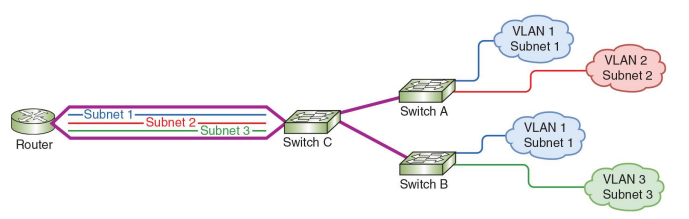
🔹 Concept
- Each VLAN corresponds to a separate subnet
- Multiple VLANs exist on switches
- Each VLAN is a separate broadcast domain
🔹 Note
Devices in the same VLAN can exist on different switches.
👉 Even if physically separated, they remain in the same broadcast domain as long as the VLAN ID is the same.
🔹 How It Works
A router connects multiple VLANs using a single physical interface.
This interface is divided into logical subinterfaces:
Example:
- G0/0.10 → VLAN 10 → Subnet 1
- G0/0.20 → VLAN 20 → Subnet 2
- G0/0.30 → VLAN 30 → Subnet 3
👉 This is called Router-on-a-Stick
💡 Why This is Important
- Saves router interfaces
- Enables inter-VLAN communication
- Widely used in real networks
🧱 Inter-VLAN Communication
Devices in different VLANs cannot communicate directly.
👉 Requires:
- Router (Router-on-a-stick)
or
- Layer 3 switch
🧱 Advantages of VLAN
- Better security
- Reduced broadcast traffic
- Improved performance
- Flexible network design
💡 Key Idea
VLANs logically divide a physical network,
👉 creating multiple isolated broadcast domains.
👉 In real networks: - VLAN (Layer 2) + Subnet (Layer 3) work together
🧱 VLAN Design Decisions
VLANs are useful only when the IP design and routing plan match the segmentation goal.
| Design choice | Best practice |
|---|---|
| User groups | Put departments, labs, guests, voice, and management into separate VLANs when their traffic needs different policy |
| IP subnets | Use a separate IP subnet for each VLAN |
| Inter-VLAN traffic | Route through a router, Layer 3 switch, or firewall so policy can be enforced |
| Trunks | Allow only the VLANs that must cross the trunk |
| Native VLAN | Avoid using VLAN 1 for production traffic; document and secure the native VLAN |
Scenario: if HR and Finance are in different VLANs but share the same IP subnet, troubleshooting becomes confusing and routing/security policy becomes harder to enforce. In most designs, one VLAN maps to one subnet.
Previous: Subnets in IPv6 | All Notes | Module 08 Exercise | Next: Security Concepts