📘 08-09: Implementing Subnets on a Network




💡 Why Implement Subnets?
Subnetting is not only a mathematical process, but also a practical network design technique.
It is used to:
- divide a large network into smaller subnetworks
- reduce broadcast traffic
- improve network performance
- enhance security
Each subnet forms a separate broadcast domain.
📌 Basic Network Structure
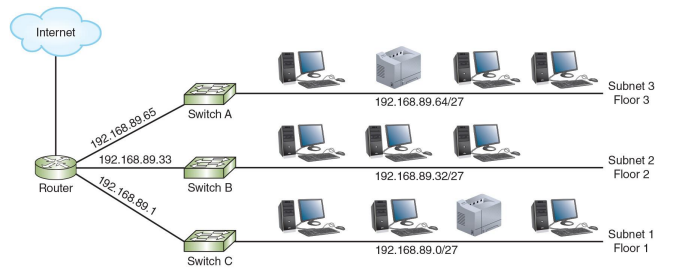
A subnetted network typically consists of:
🔹 Router
- connects multiple subnets
- each interface represents a different subnet
🔹 Switch
- connects devices within a subnet
🔹 Hosts (PCs, printers)
- assigned IP addresses within a subnet
🧮 Subnet Assignment Example
Example:
- Subnet 1: 192.168.89.0/27
- Subnet 2: 192.168.89.32/27
- Subnet 3: 192.168.89.64/27
👉 Each subnet must have a unique network ID.
📌 Default Gateway
Each subnet requires a default gateway to communicate with other networks.
- The default gateway is usually the router interface IP
Example:
- Subnet 1 → Gateway: 192.168.89.1
- Subnet 2 → Gateway: 192.168.89.33
- Subnet 3 → Gateway: 192.168.89.65
🧮 Communication Between Subnets
- Devices within the same subnet communicate directly
- Devices in different subnets communicate through a router
📌 One Router Connecting Multiple LANs
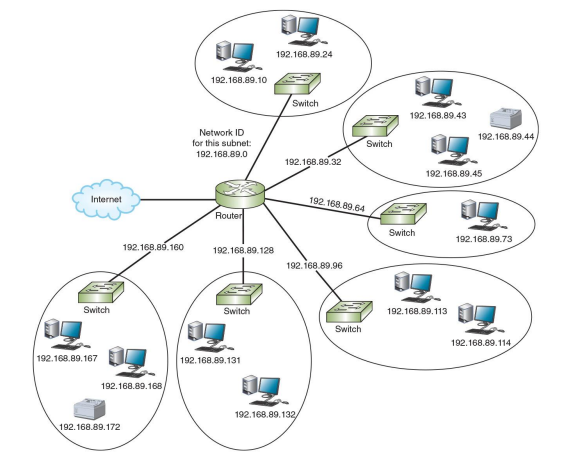
A single router can connect multiple LANs:
- Each LAN is assigned a different subnet
- Each subnet is isolated from others
- The router enables communication between subnets
Common use cases:
- office networks
- campus networks
- multi-floor buildings
🧮 DHCP Across Subnets
🔹 Problem
DHCP uses broadcast messages, which do not cross routers.
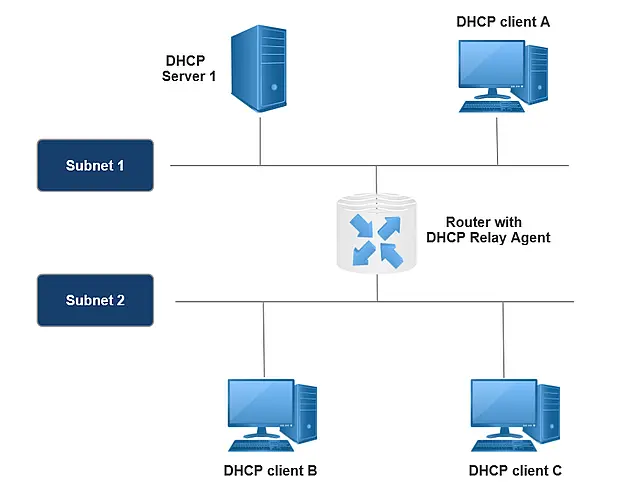
📡 Solution: DHCP Relay Agent
A DHCP relay agent allows DHCP communication across subnets.
📡 How DHCP Relay Works
- A client sends a DHCP request (broadcast)
- The router receives the request
- The router forwards it to the DHCP server (unicast)
- The DHCP server assigns an IP address
📌 Summary
- Subnet → logical division of a network
- Router → connects subnets
- Switch → connects devices within a subnet
- Default gateway → exit point of a subnet
- DHCP relay → enables DHCP across subnets
📌 Key Insight
Subnetting transforms a large network into smaller, manageable networks, enabling efficient communication and better network design in real-world environments.
Previous: Subnet Calculation Using Binary | All Notes | Module 08 Exercise | Next: Variable Length Subnet Mask (VLSM)