🌐 06-02: DNS Query Process
📌 Introduction
The DNS query process is the sequence of steps used to translate a hostname into its corresponding IP address.
The process starts from the user’s local machine. If the answer is not available locally, the request moves through the global DNS hierarchy step by step until the correct IP address is found.
🧭 DNS Query Process (Conceptual Steps)
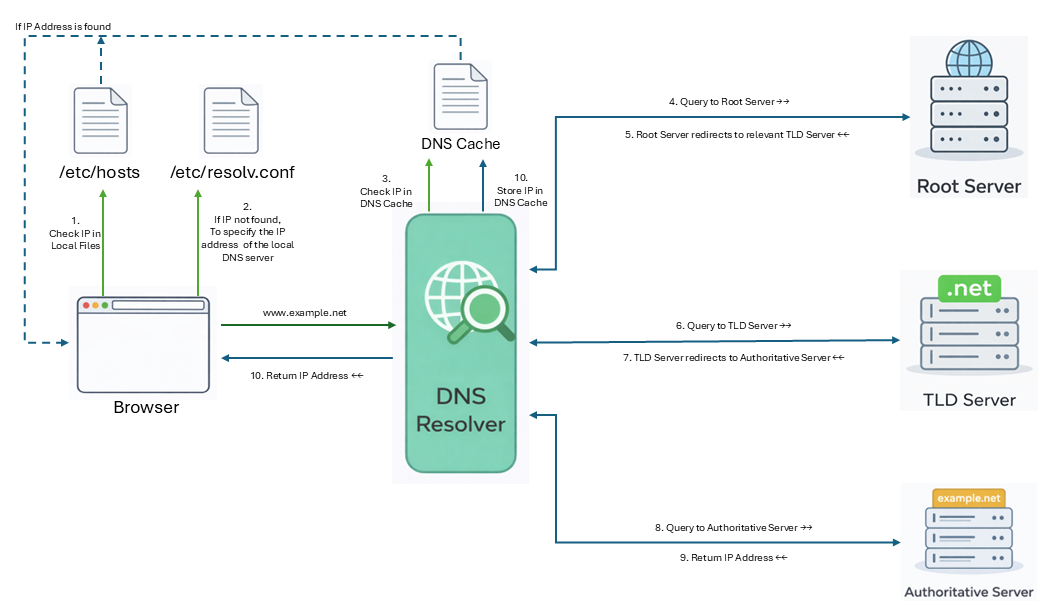
Step 1: Check Local DNS Files
Before contacting any DNS server, the user machine checks its local DNS configuration files:
/etc/hosts-
Stores manually defined hostname-to-IP mappings
-
/etc/resolv.conf - Specifies the IP address of the local DNS server
Step 2: Contact the Local DNS Server
If the hostname is not resolved locally, the user machine sends the query to the Local DNS Server.
💡 The Local DNS Server is also called: - DNS Resolver - Recursive Resolver
Step 3: Check DNS Cache
The local DNS server first checks its DNS cache:
- If found → return immediately
- If not → continue lookup
Step 4: Query the Root Server
If the answer is not cached, the resolver queries a Root Server.
- Root server provides the location of the appropriate TLD server
Step 5: Query the TLD Server
The resolver queries the Top-Level Domain (TLD) server.
- TLD server returns the authoritative nameserver for the domain
Step 6: Query the Authoritative Nameserver
The resolver queries the Authoritative Nameserver.
- Stores actual DNS records
- Returns the final IP address
Step 7: Return the Result
- Resolver caches the result
- IP address is returned to the user machine
🔄 Summary of Conceptual Flow
🔁 Recursive vs Iterative Query
🔹 Recursive Query
- The client asks the resolver for the final answer
- The resolver performs all steps (Root → TLD → Authoritative)
- The client receives the final IP directly
💡 Used between: - User → Local DNS Server
🔹 Iterative Query
- Each DNS server returns the best possible answer
- It may not be final, but points to the next server
Example flow: - Root → "Ask TLD server" - TLD → "Ask authoritative server"
💡 Used between: - DNS servers (Resolver ↔ Root ↔ TLD ↔ Authoritative)
🧪 DNS Query Process (Example: www.example.net)
Step 1: Check /etc/hosts
The system checks:
- If found → use IP
- Otherwise → continue
Step 2: Check /etc/resolv.conf
The system checks:
Example:
- This gives the local DNS server
Step 3: Query Local DNS Server
The system sends:
- Resolver checks cache
- If not found → continues
Step 4: Query Root Server
Response:
👉 Root server points to .net TLD servers
Step 5: Query TLD Server
Response:
👉 TLD server points to authoritative server
Step 6: Query Authoritative Server
Answer:
👉 Final IP address obtained
Step 7: Return Result
- Resolver caches result
- Returns IP to user
Final IP:
🖥️ Important Local DNS Files
| File | Purpose |
|---|---|
/etc/hosts |
Manual hostname-to-IP mapping |
/etc/resolv.conf |
Defines local DNS server |
/etc/bind/db.root |
Stores root server information |
/etc/bind/named.conf.default-zones |
BIND root configuration |
📌 Key Points
- DNS starts from the local machine
- Local DNS server = Resolver / Recursive Resolver
- Cache improves performance
- Query flows: Root → TLD → Authoritative
- Recursive (client → resolver), Iterative (server → server)
- Final answer comes from authoritative server